Waratah
January 27, 2026
We bought our first home last summer, and after the initial moving in, setting up, redecorating and making ourselves feel at home, winter rolled around: the perfect season for spending a lot of time at home tinkering with computers. I ended up diving deep into a project I have wanted to do for years but never felt I could justify in a rented house: building a proper home networking setup myself.
I spent quite a lot of time over the last couple of months diving into this rabbit hole, and ended up reading a lot of blogs about homelabs: a sort of environment you set up at home to allow you to play around with interesting technologies you want to learn about, and self-hosting: using your own hardware to serve applications and services for your personal use.
This write-up is an attempt to give back to the community which I learnt so much from by reading detailed write-ups about people’s setups. My setup does involve a homelab, but it is also a full build of a “production” home networking setup that serves my whole house: my wife and kids and all our devices, our “smart home” gear, guests, media, backups, and in the future more and more self-hosted services to try and fight back against the encroachment of The Cloud on our lives.
Old setup
Here’s a schematic of our old network, before I started working on changes.
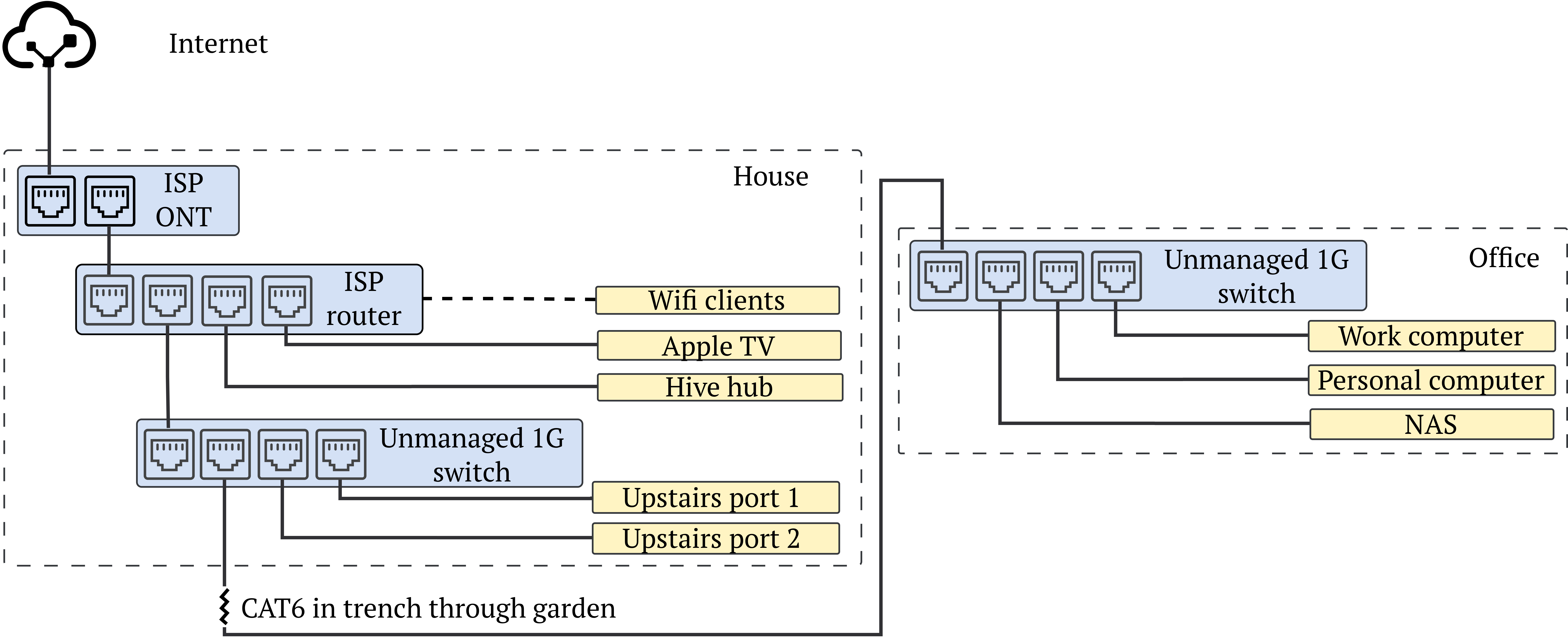
I live in London, and my ISP is Community Fibre. We are currently on a 1Gbps symmetric connection with them, which has a static public IP (note: I signed up for this almost three years ago, apparently this is not the case for new subscribers to their 1Gbps plans, you will get put behind CGNAT) and has pretty much always been reliable and achieves the line rate consistently in both upload and download (1Gbps will top out at around 940Mbps, or 117MB/s, due to various overheads). They provide an ONT into which the fibre connection terminates. This then connected to the router that they provided, which also functioned as the sole Wi-Fi access point. I connected the stuff I need in my living room directly to the router: Apple TV, Hive hub to control the heating system in my house, and then connected up a simple unmanaged switch for the three CAT6 cable runs the previous owner had installed through the walls: one out to the home office at the end of the garden, which goes through a trench, and two upstairs into nicely terminated wall connectors, which I wasn’t using (yet).
In the office, which is about 15 metres away from the house, I plugged the other end of that cable into another unmanaged switch, and into that went my laptops and my Synology DS220+ NAS. The NAS hosted a fairly basic media setup, including Plex, and was the target of Time Machine backups from my Mac.
Shortcomings
This setup worked OK for some things, but there were quite a few limitations.
- Very poor Wi-Fi coverage. We have a two-storey Victorian terrace house with thick brick walls. The ISP router worked fine in the living room and master bedroom directly above it, but the back of the house had very patchy coverage, the garden almost none, and the office none at all. Combined with the fact that our street is a 4G dead zone, this was often a point of frustration.
- No real control of routing. I have always struggled with the limited configurability of ISP-provided routers. I’d like to be able to configure firewalls, manage DNS and DHCP myself (don’t know what that means? Neither did I until I started digging!), and have real monitoring and logs and visibility into the network.
- Flat network. I would like the ability to segment my network to be confident that any IoT devices I might purchase don’t have access to my main LAN. I’d also like to be able to self-host my website through a DMZ.
- Limited to 1Gbps. I would like to future-proof my setup and support 10Gbps speeds for LAN, and in the future WAN.
- No separate NAS storage from self-hosted compute. The only way I can host services is as Docker containers inside Synology’s DSM operating system. I’d like to expand what I can host, and also separate the storage layer from the compute layer for a more robust and modular architecture.
- Lack of power. The Synology NAS has been reliable for almost five years now, and I am going to keep using it for storage for the next few years at least, but it does have a dated and fairly weak CPU and a paltry 6GB of RAM, so doesn’t really give me a playground for proper virtualisation or home automation.
Plan
I spent a lot of time researching how to improve my setup, and I came up with the following plan, broadly split into four parts:
- Build a mesh Wi-Fi network with wired ethernet backhaul.
- Replace the ISP router with a self-built router running OPNsense.
- Upgrade the entire network to support 10Gbps networking and VLANs.
- Build a dedicated server to run Proxmox VE to host all my apps.
Some other things that were important to accomplish in the project:
- Build out a solid, trustworthy backup system (Time Machine is just not good enough)
- Use infrastructure as code wherever possible
- Proper monitoring of the whole system
- Gear in the home office
- Everything nicely rackmounted, neat and tidy cable management
I decided to call the project Waratah, after one of my favourite Australian native flowers (it’s a long-standing tradition of mine to name my projects after Australian stuff). I also decided that the different components of the network (switches, servers, APs, etc) will be named after different villages in the Blue Mountains in New South Wales, Australia, where I grew up.
You can keep reading about the first step in this project here.